

SETTING UP YOUR CLINIC
Creating the right digital setup for your clinic
The right digital setup can make running a private clinic feel calmer, safer and more manageable from day one. This guide explains the core healthcare software solutions you really need, how to avoid unnecessary complexity and how to build a setup that supports both your team and your patients.
 |
Sophie Valentine Digital Health Product Leader |

Running a private clinic has shifted from relying on paper and more informal processes to depending on digital systems that support and improve how care is delivered. From clinical records and online booking to patient communication and payments, these tools now shape not just administration, but the day-to-day delivery of care.
Together, they make up what’s commonly known as your clinic's ‘tech stack’. Automation can handle many of these routine tasks, saving time, improving quality and reducing clinical risk when implemented thoughtfully.
Many small clinics struggle because they choose systems for immediate needs, gradually adding more tools to solve short-term problems without a clear long-term strategy. This creates multi-system setups, gaps in what teams need and a loss of confidence that increases cognitive load and the risk of errors.
When tools are well connected and fit the way teams actually work, they simplify operations by reducing manual tasks, clarifying ownership of information and supporting safe, efficient care.
The essential systems every private clinic needs from day one
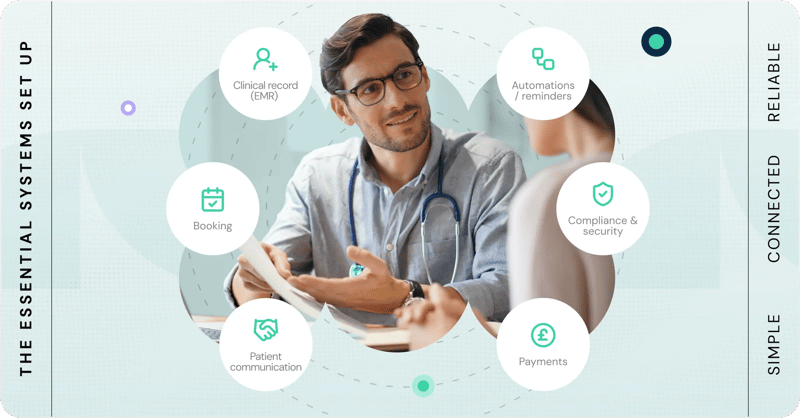
A working clinic needs surprisingly few digital systems, but the ones it does need must be reliable and well understood.
At the centre is a way to manage patient data: your electronic health record (EHR). This is where clinical information lives, including consultation notes, decisions, lab test results, risk management and the record of care delivered.
Alongside this, clinics need a way to book appointments, communicate with patients and take payments (which may include handling private medical insurance, if it’s a part of their business model). None of these need to be sophisticated on day one. Early clinics often use a shared inbox for communication and may take bookings over the phone for a short period. As long as your systems do what you need and meet your CQC compliance obligations, simplicity is usually an advantage.
When choosing clinic management systems, the most important functions to look for are:
A core clinical record for safe and effective care:
- Clear patient identification with no duplicate records
- Prominent allergies and risks
- Up-to-date contact details
- Reliable tracking of results and follow-ups
- Visibility of patient messages so urgent queries aren’t missed
Tools to ensure care can be delivered efficiently:
- Automated appointment confirmations and reminders
- Intake forms and patient health questionnaires completed before appointments
- Templates for common messages and follow-ups
- Online bookings, online payments, patient portals and other features that support patients to self-serve elements of their clinic interactions
Compliance with regulatory requirements (varies by service):
- Access controls (who can see what) and audit logs (proof of who has seen what)
- Patient feedback collection
- Incident reporting and learning
- Compliance with data protection regulations (e.g. GDPR)
The ability to manage cash flow:
- Visibility of current cash balance, as well as patient billing and patient payments
- Awareness of committed costs (subscriptions, salaries, rent)
Tools such as custom patient apps, standalone CRMs, advanced telehealth platforms and complex analytics are usually better introduced later. Clarity and consistency matter more than capability: most patients prefer a clear auto-reply explaining response times over a 24/7 chatbot that can’t answer their question properly.
Design your clinic workflows before adding more software
Most clinic workflow problems aren’t caused by bad software, but by processes that are unclear, inconsistent, or only understood by a few people. A good starting point is mapping the key phases of care: typically discovery, first contact, triage, booking, care delivery, payment and follow-up. The order of these may vary depending on priorities like growth or demand.
Using a hypothetical patient journey helps clarify what gets recorded where, what triggers reminders or follow‑ups and what happens when something goes wrong. Designing workflows around predictable patient experiences - and proactively planning for common failures like missed enquiries or delayed results - creates smoother, more reliable care and patient management. Once that’s clear, you can choose systems and integrations that reduce risk and admin load rather than adding extra steps.
Avoiding disconnected systems and hidden admin headaches
Disconnected systems create problems over time. When systems don’t integrate, clinics typically fall into one of three patterns: manual copying between tools, missing or duplicated data or running multiple systems side-by-side. All three increase effort, error risk and burnout.
Early clinics don’t need perfect integration, but they do need clarity. A simple checklist helps:
- Do we know which system is the main, authoritative place where each type of data lives?
- Can patient booking, communication and clinical records share key information?
- What does the integration actually do in practice?
- Who notices if it breaks?
- Does it support today’s workflows, including edge cases?
When choosing systems, look for vendors that are transparent about how integrations work and prioritise integrations as part of their core capabilities. Strong integration partners tend to prioritise depth over breadth, work collaboratively with customers and avoid locking clinics into inflexible contracts.
Third-party automation tools can help fill gaps, but they can be fragile and often require more technical confidence than small clinics have. They’re best seen as a supplement, not a substitute for a well-integrated tech stack.
Where to invest in your tech and where to keep it simple
Overspending on tech is usually driven by uncertainty rather than extravagance. Practical ways to avoid it include:
- Anchoring spending to today’s needs, not future assumptions
- Accepting more manual work when cash is tight and time is available
- Negotiating where possible
- Avoiding long-term contracts that scale cost faster than value
Knowing when to upgrade your clinical software is less about complaints and more about impact. If a change makes work nicer but not faster, safer or more reliable, it may not be a priority - though over time, poor day-to-day experience can affect retention and performance. Clear signals to invest include:
Heavy reliance on workarounds: If receptionists are manually copying patient details from a booking system into EHR software because the two systems don’t sync, potentially leading to duplicate records or missing medical history - it might be time to find a system that connects better with the rest of your setup.
Incidents or near-misses: For example, if patient questionnaires and intake forms don’t integrate with the EHR, clinicians might be at risk of taking action while missing key medical information like health history, medications, or allergies.
Technology blocking a defined business goal: For example, if you want to get to 100 appointment bookings per week and your admin assistant takes 30 minutes on average to book each appointment, without investing in a patient self-serve booking system, your admin will be working 50-hour weeks!
Scaling with minimal disruption usually means modular systems that can grow with you and incremental change, supported by ongoing training and monitoring.
Building a setup that protects patient data and earns trust
Clinics must understand their obligations around data protection and clinical safety, and how these map to both technology and daily processes. Non-negotiables include:
- Protecting patient data through secure storage and access controls
- Managing clinical risk, including timely escalation and follow-up
- Ensuring traceability with individual logins and audit trails, so you can see who’s accessed or changed a record
- Having incident plans for data breaches and tech outages
Resources from the ICO, CQC and NHS DSPT help clarify responsibilities, even if they don’t prescribe specific tools. Many clinics work with consultants to develop proportionate, risk-based approaches that balance security and usability, revisiting decisions as they grow.
Most data protection mistakes include email errors, shared logins and defaulting to consumer tools not designed for sensitive health data. Patient safety risks often stem from unclear ownership, reliance on memory, or lack of confidence using clinical systems. These are as much process issues as technical ones.
The most common tech mistakes new private clinics make
Common regrets include:
- Over-engineering before workflows and demand are stable
- Locking into inflexible contracts or proprietary systems
- Treating compliance as something to fix later
- Accepting vendor claims without scrutiny
- Failing to assign clear internal ownership for risk and decisions
Most early decisions aren’t permanent. The goal is not perfection, but systems that can change over time without breaking care.
One important mistake that’s often overlooked with new software for clinics is forgetting to invest in sufficient set-up and ongoing training for teams using the tools. This can prevent users from realising value the tools offer by either using systems inefficiently, or missing out on some functionalities altogether.
Your first 30 days in private practice: Stability over optimisation
Clarifying your core workflows, then implement only the essentials: a clinical record, patient scheduling and booking, secure communication and payments.
Building your tech stack in layers, ensuring each system works reliably before adding the next. Prioritise integrations that reduce risk and mental load.
Strengthening your foundations by documenting workflows. Think through what could realistically go wrong and set expectations for everyone using the system.
Evaluating tools pragmatically if something saves time on a task repeated multiple times a day, the gains compound. If it introduces friction or risk, step back.
The first 90 days: Improve your tech stack
Better training: Gather team feedback and shadow people using the system to ensure your team is confident using the systems. Check that key features - especially ones that may have been overlooked or misused - are delivering their full value.
More advanced automation: Once you’ve identified the most repetitive or time-consuming administrative tasks, you can introduce tools or automations to streamline them.
Technology that helps your clinic stand out: By this stage, you’ll be gaining insight into what matters most to your patients. This creates an opportunity to use technology not just to run your clinic efficiently, but to create a better, more distinctive patient experience.
Remember that the strongest early setups aren’t impressive or feature-heavy; they’re calm, clear and dependable, quietly supporting safe and efficient care.

Sophie Valentine is a digital health product leader focused on how technology shapes clinical operations and patient experience. She has worked on healthcare platforms used by both care teams and patients, with a particular interest in workflow design, safety and reducing operational complexity in healthcare organisations.
Her work centres on helping healthcare providers implement technology that supports reliable, efficient, high-quality care.