

SETTING UP YOUR CLINIC
Building workflows that scale with your practice
The systems you build in the early days of private practice often become the habits you live with for years. Here’s how to design workflows that save time, reduce admin and grow with your practice.
 |
Andrew Baldwin Healthcare Integration Consultant, HealthAutomate |

When you first start building a private practice, most of your attention naturally goes to clinical care, establishing your patient base, and making sure everything runs safely.
What many clinicians don’t realise is that habits created in the early days of practice management often become the systems and processes you live with for years to come.
Having worked with practices running all kinds of different setups, I’ve seen a common problem with workflows. What start out as simple processes gradually turn into ‘Frankensteins’: small tasks get added or changed, responsibilities shift between people and before long, it quietly becomes something that takes far more time and effort than it should.
If you’re setting up a new practice, you have a valuable opportunity to avoid that. The earlier you pay attention to your workflows, the easier it is to build a practice that feels organised, efficient and easier to run.
What do we mean by ‘workflow’?
A workflow is simply the path a task takes from start to finish.
In a typical practice, that might begin with a phone call or online enquiry. It then needs to be reviewed, possibly triaged and eventually resolved, often using some kind of clinic management software. Each step in that journey should be considered.
A simple way to understand a workflow is to ask: What happens next?
Following that question as work moves through your practice is the key to revealing the steps involved and, over time, streamlining them.
Common workflow bottlenecks to watch out for
Most workflow problems don’t start as big issues. They tend to build gradually as a practice grows and processes are adjusted without being redesigned.
Some common bottlenecks include:
-
Duplicated admin: The same patient information being entered into multiple systems or documents by different staff members.
-
Unclear ownership: When it isn’t obvious who is responsible for the next step, work can sit in inboxes or task lists longer than it should.
-
Too many hand-offs: A simple request moving between several people before being completed can create unnecessary delays
-
Using email as the default workflow tool: When email becomes the place where all tasks live, as opposed to more suitable clinical software or systems, it becomes harder to track progress, prioritise work or maintain consistency.
-
Automation that still creates queues: Healthcare automation can be powerful, but if a process still needs a manual review or approval before it can continue, it can unintentionally create a new bottleneck.
Spotting these patterns early gives you a much better chance of building workflows that stay efficient as your practice grows.
Your first 30 days: Start with the patient’s first contact
In my experience, the best place to start is with your core processes. The easiest way to approach this is to follow the patient journey from start to finish.
Focus your first 30 days on the very beginning of that journey: the patient’s first contact with your practice. This could be a registration form, an online patient booking request, a phone call or an enquiry email. Getting this stage right not only helps your internal processes run more smoothly but also creates a positive first impression for patients.
A good starting point is something simple like patient registration. Think about how and where the patient’s information is collected, how it moves into your systems and what your team needs to do next. Write these steps down.
For each step, ask yourself:
- Can I use a tool we already have to help with this?
- What is the output of this step (some information or an action)?
- What information is passed to the next step?
The first question here is key: a common mistake I see is practices adding extra tools that only solve one or two problems but add more complexity elsewhere.
When starting out, try to be resourceful and fully understand what you already have at your disposal within your practice management system. This reduces the risk of having to retrace your steps later and remove tools from your workflow.
When mapping out your patient journey, also consider where automation could save manual time, such as with scheduling and appointment reminders or post-consultation follow-ups. If you are implementing automation, ask whether it introduces a manual break point that could create a bottleneck – for example, if the output of an automated step needs to be checked by a staff member before continuing.Even partial automation can still provide significant benefits in many cases.
Planning for these patient journeys and where bottlenecks might appear makes for smoother workflows and smoother care.
A simple example: patient registration
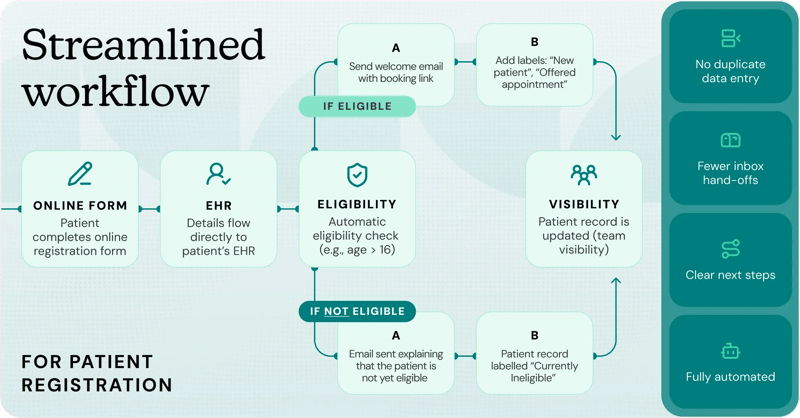
A registration workflow might look something like this:
- A patient completes an online registration form
- Their details are added directly to the patient record
- Basic eligibility checks happen automatically where appropriate
- If eligible, they receive a welcome message and booking link
- If not, they receive a clear next-step message
- The record is updated so your team can see what has happened
Even a simple setup can save a significant amount of admin compared with paper forms, manual data entry and back-and-forth emails.
When these small steps are connected properly, your practice runs more smoothly behind the scenes and patients get a more consistent experience.
The next 90 days: Closing the loop
Once you have your patient intake journey working smoothly, the next step is to look at what happens after registration so the rest of the patient journey feels just as joined up.
This means documenting and streamlining what happens after registration: when a patient begins treatment, continues through their care pathway and eventually reaches discharge or longer-term monitoring.
During this period, focus on designing workflows for key stages such as:
- Appointment booking and reminders
- Treatment sessions and clinical documentation
- Follow-up communication
- Patient billing and patient payments
- Discharge summaries and ongoing monitoring
The goal – even if it takes longer than 90 days to fully achieve – is to create processes where patients can move through these stages with minimal delays, minimal manual intervention, and clear visibility for your team about what happens next.
When workflows are designed well, staff spend less time managing admin and more time focusing on patient care.
Helpful Tips
Pay attention to repeated tasks
Look for tasks that occur repeatedly throughout the week. Addressing these often leads to quick wins and can help your team reclaim significant amounts of time and capacity.
Keep it simple as your clinic grows
As your practice expands, one of the easiest mistakes to make is building separate versions of the same process for every clinician, service or location. That can quickly become difficult to manage.
Where possible, build workflows that are flexible enough to adapt as your clinic changes. If you can update one core process rather than duplicating the same one multiple times, you’ll save yourself a lot of effort later.
It’s also worth thinking about where you’ll get the biggest return first. If one service is likely to be in much higher demand than another, it usually makes sense to improve that workflow before spending time refining something used only occasionally.
Once the basics are working, think beyond admin
Once your core workflows are running well, you can start thinking more proactively.
That might mean building simple recall processes, follow-up reminders or monitoring pathways that help patients stay engaged and reduce the risk of things slipping through the cracks.
For example, if a patient needs a follow-up test or review in six months, that next step can often be scheduled and tracked through your practice management software in advance, rather than relying on someone to remember it later.
These kinds of workflows don’t just reduce admin. They can also improve continuity and create a more consistent patient experience.
Think in connected systems, not separate tools
Many clinicians think of the tools they use as separate systems: a patient booking system, an email inbox, a payment processor, a clinical record or a messaging service.
In reality, these tools often work together far more smoothly than people expect. Think of it as building a small ecosystem around your practice.
The more your systems can pass information between each other, the less manual admin your team has to do - and the less likely it is that something gets missed.
That doesn’t mean adding more technology for the sake of it. In fact, it often means the opposite: using fewer tools, but using them more effectively.
A few simple questions to ask yourself are:
- Could this step happen automatically?
- Could this information be reused instead of entered again?
- Could one tool trigger the next step for me?
- Are we introducing a new tool that only solves one small part of the problem?
Over time, small changes like this can make a practice feel calmer, more joined up and much easier to run.

Andrew is a leading provider of IT and compliance solutions within private medical practice, stemming from a background in CQC auditing and systems administration. As the founder and integration consultant of HealthAutomate, he works with general practices, sports clinics, aesthetic clinics and more to automate manual tasks and improve their practice efficiency.